













The Flash Firmware page now sets up more than the dpCREATOR R3. Pick your board, pick a configuration, tick the apps and type your network details, and the page does the rest over USB: firmware, config, apps, Wi-Fi and login. You need Chrome or Edge on a computer, a USB cable and a free dpcreator.eu account.

Your board, from a list
Choose from 21 boards: the dpCREATOR R3 and R2, the Doberman, and FluidNC boards from other makers such as the 6-Pack, the Jackpot, the MKS DLC32 and TinyBee, the OpenBuilds BlackBox X32 and the FYSETC E4. Under the list, the page shows what that board can have with dpCREATOR: the firmware build, Ethernet, job recovery, the apps and the pendant.
The board decides which firmware is flashed. ESP32-S3 boards get the same build as the R3. Classic ESP32 boards (WROOM-32) get a build made for that chip: Wi-Fi instead of Ethernet, and the features that need the S3's extra memory use smaller versions.
A ready configuration
Most boards come with ready config.yaml files from the FluidNC community config collection (GPL-3.0). Every file is checked against the firmware's own list of settings before anything is written, and you can change it in the editor first. You can also keep the config already on the board, pick your own file, or answer a few questions and get one built for your machine.
Apps in the same go
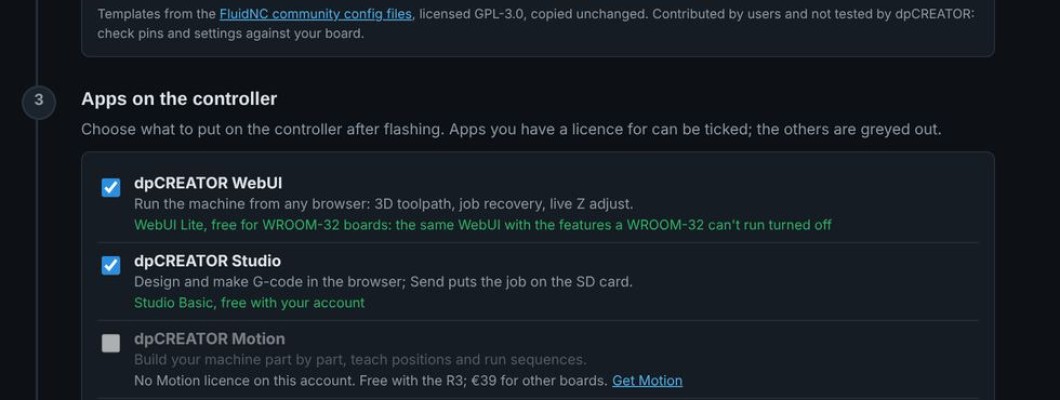
Tick the apps before you flash and they are installed right after the configuration:
- dpCREATOR WebUI: runs the machine from any browser. Free with the dpCREATOR R3 (on its own or in the combo); €19.99 for other boards.
- WebUI Lite (new): for WROOM-32 boards, the same WebUI with the features that chip can't run turned off. Free with an account, and it works with Studio Basic.
- dpCREATOR Studio: design and make G-code in the browser. Studio Basic is free.
- dpCREATOR Motion: build and automate your own machine. Free with the R3, €39 for other boards.
Apps you have a licence for can be ticked; the others are greyed out with a link to get them. On WROOM-32 boards, Studio and Motion go on the SD card, so put a FAT32 card in the board first.
On your network from the start
A freshly flashed board has no access point and no password, so only USB can reach it. In the Network and login step, choose an Ethernet cable (R3) or Wi-Fi, give the board a name and set a login password. The page sends them over USB after flashing, restarts the board and shows its address, for example http://192.168.1.57/ or http://plasma.local/. The passwords are only sent to the board; the page does not store them.
Already flashed? The same step has a link to set the network and login over USB without flashing again.
Pendant on WROOM-32 boards
The SmartTabUI pendant works with WROOM-32 controllers too: choose it in the pendant's settings.
New in beta: dpCREATOR PnP
A pick-and-place app for FluidNC machines: a top camera finds the board's fiducials and the parts in the strips, a bottom camera checks each part on the nozzle, and the vacuum nozzle places them. It is in beta: tell us about any issue and it gets fixed as soon as possible. Read before you start; R&D Club members try it first. The full WebUI already has a head camera with a crosshair for waypoints and measuring.
Questions
Not sure which board you have, or the config doesn't match your machine? Write to us from the contact page with a photo of the board.