













12 Oct
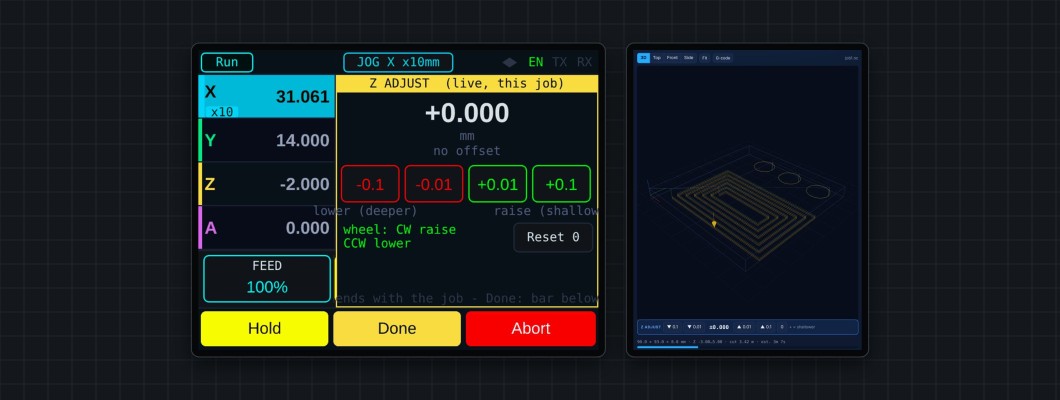
Live Z adjust
Change the cutting depth while the job runs — for example when the first pass shows the material is thicker than expected.
- + raises the tool (shallower), − lowers it (deeper).
- At most 0.5 mm per step and ±1 mm in total by default (
$Job/ZAdjust/Limit=<mm>, 0.05–5 mm). - Temporary: it ends with the job. The DRO keeps showing the file's Z.
- Works while cutting and in Hold (in Hold it applies on Resume).
WebUI: the Z ADJUST bar under the 3D view. Pendant: tap Z adj, hold the enable button, then tap the steps or turn the wheel (clockwise raises).
When the job ends with an offset, you're asked whether to move the work Z zero by it so the next run cuts the same — Apply or No.


Handwheel rewind
While a job is in Hold, move the tool back along the path it already cut, change the height, and re-cut to where it stopped.
- Hold, then Rewind. On the pendant the override boxes become Z ADJ | REWIND: tap REWIND, or with ENABLE held turn the wheel clockwise. In the WebUI, use the Rewind bar.
- Turn the wheel anticlockwise to go back along the path, clockwise to go forward (0.1 / 1 / 5 mm per click on x1 / x10 / x100), or use the WebUI buttons. The pendant shows how far back you are, and a bar shows it against the most the controller can rewind. You can't go past the hold point.
- Adjust Z there if needed (Z−0.1 … Z+0.1).
- Continue (tap twice) re-cuts to the hold point at the new height, then the job resumes. Cancel returns to the hold point at the old height. On the pendant the panel stays open while it re-cuts or returns, then closes by itself and the toolpath view comes back.
Rewind stops at tool changes and spindle speed changes, and isn't available in laser mode.